
Blog posts/content are arguably the most important SEO ranking factor for your website. For the majority of websites, content is what visitors come to see. For example; people visit the BBC for its written content because it is informative. If you run a blog site, people will visit you to learn more about your opinions, thoughts and specialist knowledge.
It is important that you create useful, informative and engaging content for users to view with the aim to increase the number of visitors to your website.
This post is written with the thought that you have completed your content and keyword research. If you haven’t done this, feel free to check out my blog post about what keyword is and how to do it.
Meta titles and meta descriptions
If the user is visiting your website via a search on Google, then the first thing that they will see regarding your blog post is the meta title and meta description. Highlighted in red in the below (poorly created) screenshot is the meta title (1) and meta description (2). Every indexable page on a search engine has a meta title and meta description.
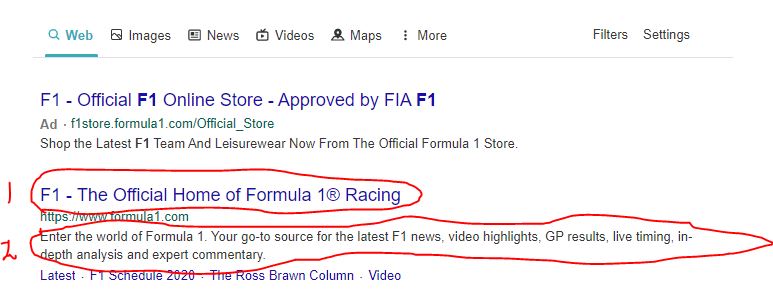
Meta titles
It is important to optimise these to try and entice users to visit your website. The meta title is a ranking factor that Google uses when placing you on a SERP (search engine result page). Therefore, optimising the meta title is an important method to gain as many impressions as possible.
Meta titles are a maximum of 60 characters so ensure that you do not exceed this limit otherwise Google will look unfavourably at it.
Try adding the business/website name, geolocation and keyword. This is quite a bit to add considering you can only use 60 characters but these are the main factors that Google and other search engines consider when ranking your page.
Meta descriptions
Meta descriptions are a useful tool that Google uses to understand what the content within the page consists of. Therefore, you should include information that you view is important to the page in a short concise sentence as the maximum character limit is 160. Try and include a CTA (call to action) to try and drive the user to visit the page. Something like; ‘book now’ or ‘visit our website’ or ‘learn more’.
Headings and sub-headings
Headings and sub-headings are important for a page to help the user understand what section they are on. Try and include a relevant keyword in the heading so that when Google crawls the website it can find a keyword-rich heading and improve your SERP ranking.
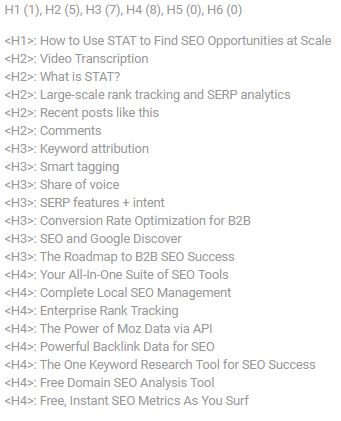
You should structure your headings and subheadings in terms of importance to the title. There should only be one H1 which is the title.
For example, is the heading very similar to the title of the page? If so, it should probably be an H2. Is it not really related? Maybe it should be an H3 or H4 then. See the screenshot to the right which helps us understand how relevant the headings are to the title.
‘What is STAT?’ is a deserving H2 because it has ‘STAT’ in the heading which is the same as the title.
‘Enterprise Rank Tracking’ is fine as H4 because it is not relevant to the title in terms of keywords or context.
Paragraphs
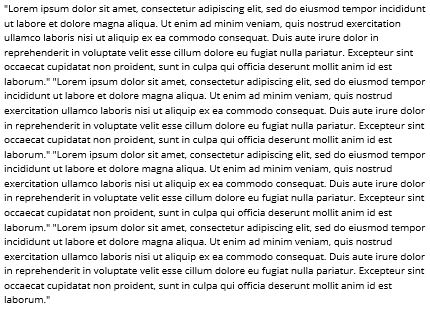
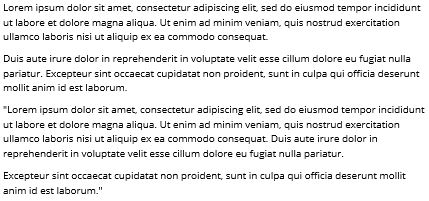
Content for users has to be engaging otherwise they will just leave. Whilst the content that you write may be engaging and informative, if you do not space your paragraphs, visitors might get disorientated. If you can look at the example content below, see for yourself which is more enjoyable to read. Visitors reading the first example see a large amount of content without space unlike the second example which is in nice 1 or 2 sentence paragraphs is much easier to read.
Lists/bullet points
User attention on a page is critical to the success of the page because if the information presented is in a monotonous and boring manner, then the visitor will get bored and leave. Bullet points allow you to give a quick synopsis of your point that is easily understandable whilst looking attractive on a page. For example:
“Which are the most popular sports in England?
Football, cricket, rugby union, rugby league, formula 1, horse racing and tennis.”
“Which are the most popular sports in England?
- Football
- Cricket
- Rugby Union
- Rugby League
- Formula 1
- Horse Racing
- Tennis”
To me, the bullet point list is way more interesting to look at compared to the list above which both have the exact same information.
Also, search engines produce featured snippets which is a small section of a page that provide crucial information in relation to a user’s search query. Bullet points are a favourite of Google as they often use them to display the information that the user wants. Please see an example below:

Internal and external linking
Internal linking is a good way to get users to visit more of your pages. If you can find a way to incorporate another page into the one you are creating, then you get the chance to introduce the visitor to more of your content.
Incorporating an internal or external link into the page should be subtle and not obvious. The best way to do this is via an anchor text. An anchor text is a visible link on a page that users can click to take them to another page. If you want to add a link to your page, try and create an anchor text that has a relevant keyword to the linked page. Please see below for an example of how to properly use an anchor text.
An external linking example:
If you are writing about coffee and want to link to one of your previous pages or to an authoritative website to help your point:
“Whilst they are delicious and provide a kick in the morning, too much coffee can have a bad impact on your health“. – I have included the link into a sentence without being too obvious and distracting the visitor.
“Whilst they are delicious and provide a kick in the morning, too much coffee can have a bad impact on your health click here to find out more”. – Avoid anything like ‘click here’ because it doesn’t help Google identify the keyword for the link.
An internal linking example:
If you are writing about Google My Business and want to provide some help about what to include in your profile:
“Google My Business is a fantastic tool to help increase your visibility but make sure you learn about what you should include in setting up your Google My Business profile“
Photos/videos/infographics
Any type of media on a page can be engaging for a visitor which is why it is essential to have some sort of image or video so the page isn’t just text.
Videos are great for SEO because if the visitor is watching, it means that they are staying on the page for longer which means that the average page duration is longer, resulting in better analytics.
For each image you have on the page, it is wise to ensure the Alt tag and filename are optimised to describe what’s in the image or to describe the content of the page. Furthermore, the size of the image musn’t be too large because it can slow the page due to loading time which impacts the search engine’s ranking of the page.
 Harry Buckley