
For those wanting to grow and develop your website, keyword research and implementation is imperative to reaching a larger audience. By having keywords on your website, you are able to rank for more search queries from users since you would be targeting specific keywords that you have researched.
Keyword research works for all types of businesses, whether you are an e-commerce business, fighting for competition or you are a small artist in a local area, relevant keywords can improve your website visibility and therefore, grow your business.
Step 1 – Identify your products/services
Whilst you can think of your top products/services off the top of your head, it is also beneficial to visit your website and find the pages at the top of your website which users navigate with to find specific products/services. As you can see from the screenshot below, I have highlighted the main services of Parfitt Cresswell (a current SEO client of mine). They offer solicitor services in Family Law, Property Law, Wills & Probate and Business Law. These are what we call the ‘seed keywords’ as they form the pillars for the keyword research.

Step 2 – Separate seed keywords into manageable systems
By separating the main services/seed keywords, you are able to plan and organise your keyword research that you can implement them on the website easier. Go to the first seed keyword and list the sub-services that you offer. Business Law, for example, has; disputes, employee disputes, employer disputes and settlements as sub-services. Each topic has thousands of keywords as it is a competitive industry. Organise a file or spreadsheet with these sub-services so that when you implement the keywords for these specific pages, you have the right ones to hand. Below, you can see an example of how I would lay the spreadsheet for ease of use.

Step 3 – Begin the keyword research
Once you have your sub-service/sub-product keyword, you can now conduct your keyword research. There are many paid tools that allow you to research keywords but I will focus on the free tools. Google keyword planner is a free keyword research tool offered by Google which allows you to enter a specific phrase (your sub-service/sub-product phrase) into its database and compiles a list of 100+ relevant keywords along with some analytical data about each one.
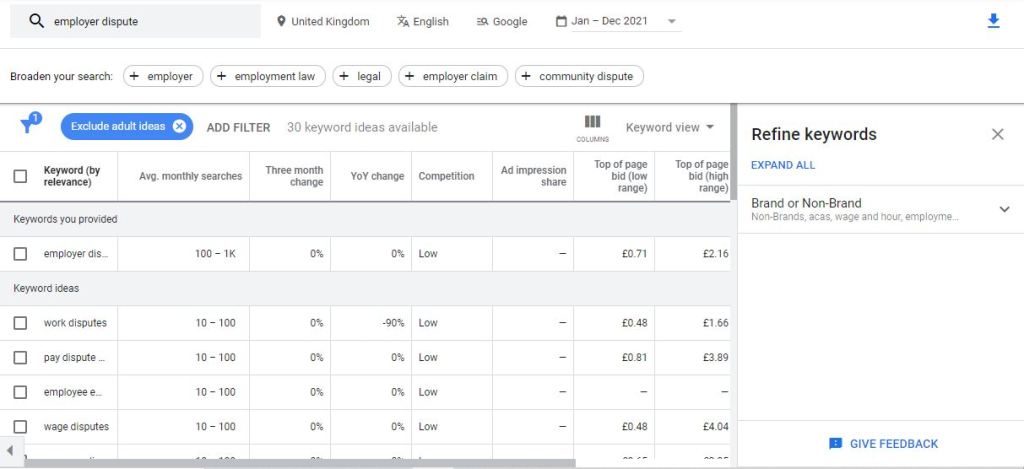
Above, is an example of when I search ’employer dispute’. As you can see, it has provided 30 relevant keywords along with valuable data like; average monthly search volume, the competitiveness of the phrase and the change in searches. This information allows you to understand whether the suggested keywords are valuable to your website. You are not expected to use all 30. Depending on the size of your website/sub-pages, you can use the top 5-10 most relatable. Download the suggestions via the button at the top right and save them to the spreadsheet for future use. Now, do the same for the other sub-services under each seed keyword and you’ll have your list of relevant and useable keywords to grow your organic traffic on your website.
How to use your keyword research
Once you have done your keyword research, it is now time to put it to use. There are so many avenues where you can implement keywords into your website to boost your online visibility. Below I will provide a brief list of locations on the website:
- URL
Google crawls websites and checks the URL to see whether the URL matches what is on the page.
- Meta Title & Meta Description
The meta title is one of the best ways of ranking on Google as it explains to the user the title of the page. Having a keyword present shows Google that the page deserves to be ranked. Whilst the meta description is used to rank a website, it provides the user with some information about what is on the page. These meta tags are crucial for drawing attention to the website on the SERP because if it is attractive, it ca encourage the user to click through to the page.
- Title & Headings
Having keywords in the page title and headings shows Google that the page is full of content relating to a specific phrase which likely improves the ranking of your page on the SERP.
- Content
Having a keyword relating to the exact same keyword in the title, heading or URL shows to Google that this page actually has content similar to the Title which incentivises the algorithm to improve the ranking of the page. However, it is important not to keyword stuff on the page because Google updates are targeting keyword-stuffed pages and penalising them.
- FAQs
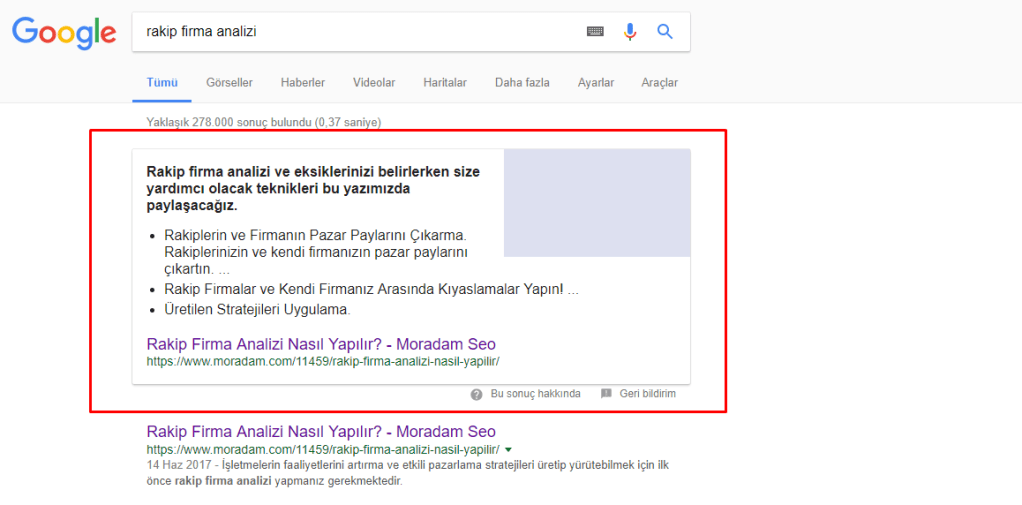
FAQs are a good way to rank the website because it shows to Google that you are actively answering the public’s questions. Furthermore, using FAQs with keywords, improves your chances of appearing in featured snippets which are boxes in the search page which direct a user to an answered question. Featured snippets are extremely valuable as they encourage users to visit the website since you have experience in answering the question.
If you conduct your keyword research using this method and implement the phrases into the website locations that I have explained, then you will be guaranteed to improve your online visibility. Don’t expect instant success as SEO is a long-term process.
 Harry Buckley