
Google Analytics is an incredibly useful tool that all marketers should use to enhance their campaigns. There are multiple benefits of using Google Analytics for your SEO campaign which I will discuss below. Google Analytics is only a small part of the Google Marketing Platform which was created to provide smarter marketing and better results for businesses.

What are the 6 benefits of using Google Analytics for SEO campaigns?
1. Google Analytics is free
That is all that I need to say about this really. Pretty much every SEO tool out there either costs money or is free but offers limited use. However, Google Analytics is not only free but it also offers 100% access to vital information.
2. Track Traffic
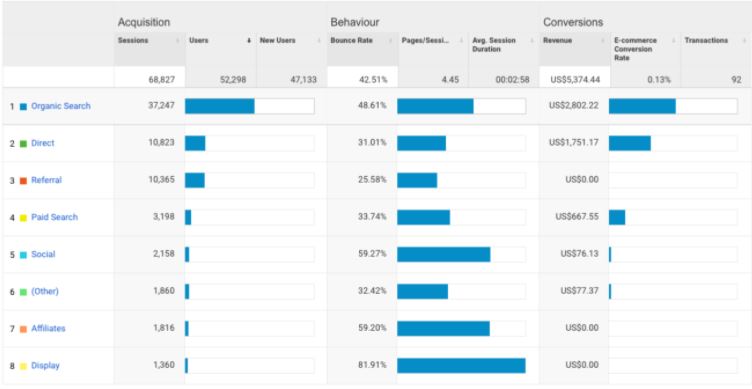
Google Analytics allows you to understand where your traffic has come from both online and geographically. There are a plethora of avenues that customers use to visit your website which is why it is important to know which channels are the most and least popular. This is useful because you can target specific online or geographical areas with future content/marketing practices if you wish to strengthen or improve the user count from these channels.
3. Understand user behaviour
Google Analytics allows you to understand how the user, visitor and customers use your website. This information can help inform you to make decisions that can optimise the website. Below are some of the main data metrics that you can use to understand user behaviour.
Bounce rate
Bounce rate is the percentage of all sessions on your site in which users viewed only a single page. Basically, the lower the bounce rate, the better because it means that more users are viewing multiple pages on the website. The ideal bounce rate is between 25%-35% with anything above 50% being poor.
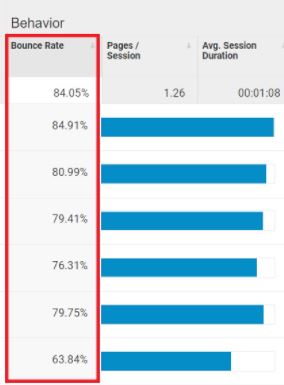
Understanding your bounce rate is crucial to know your user’s behaviour towards individual pages and the overall website. If you spot pages with a low bounce rate, then analyse them to understand why it is so low and try to use that information for the pages with a high bounce rate with the aim of lowering those bounce rates.

Behaviour flows
Behaviour flows visualise the path users have travelled from one page or event to the next. It is common knowledge that one of the biggest factors for Google understanding how good your website for SEO is the user journey. If it takes users too long to get to a specific page, then they will likely leave which will reflect negatively upon your SEO ranking.
It is useful to understand the user behaviour flows as you can find methods to reduce the distance of the path for a better user journey. This is where you can possibly implement drop-downs in the navigation bar at the top of the page to help provide users with more options without having to search the website.
Pages/Sessions
You can see how many pages/sessions that a user visits on the website to get an understanding of how they interact with the website. Google Analytics displays the number of pages visited for the whole website so you can see which pages are the most popular and the ones that are the least popular.
Getting an understanding of how many pages users visit per session can indicate to you how captivating your website is and by making changes like better site navigation or new and improved content can improve the number of pages viewed by users.
Average session duration
Google Analytics allows you to view the average session duration that visitors are on the website so that you can figure out if they are staying on the website for long and engaging in content or if they are not only for a long time and bouncing off.
If you identify pages that have a low session duration then you should find methods to improve them. The most common examples are implementing more content on the page as they will spend more time reading it or introducing a video which they would watch which increases the time that they are on the page.
Page views/Top performing pages
Google Analytics provides crucial data which shows how many page views the website has in total and how many views each page receives. It is important to identify the pages that have high views and understand why they are performing well so that you can replicate this on the poor-performing pages.
By determining the pages that have high page views, you can see what factors are contributing to the success and transfer that to the lower-performing pages. The common example of improving page views is to implement better meta data which includes meta titles, meta descriptions and headers.
4. Demographics
Google Analytics allows users to understand the gender and age of all visiting users. This is useful because if the data suggests that you have a majority of a specific demographic, then you have the ability to target this with content, products or marketing practices.

5. Google Analytics Goals
Google Analytics provides the user with the ability to set goals that show conversions from the website. There are 4 goal types that you can create; destination, duration, pages/screens per session and events. You can decide which of these are best suited to your SEO campaign.

The reason why this is a useful metric is because it allows you to understand how close you are to your target objectives. If the goals show that you are on track, then there is nothing more that you need to do. However, if you are down on your targets, then you need to come up with some ideas in order to try and get up to speed.
6. Data reports
Google Analytics equips users with the ability to create custom reports filled with valuable data. This is ideal if you want to provide clients with useful stats that highlight success.
 Harry Buckley